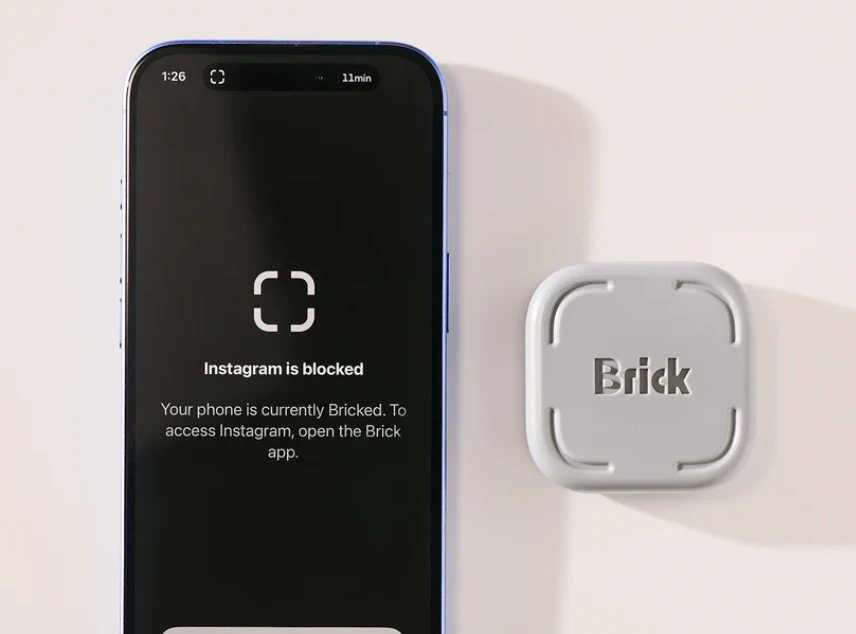
You promised yourself five minutes, then lost another hour scrolling. Could Getbrick finally help break the habit that screen time limits haven't fixed?
All featured products are selected by our editors and may include affiliate links. If you purchase through these links, we may earn a commission.
You open your phone to answer one message, then look up twenty minutes later with no idea where the time went. You've tried app limits, silenced notifications and promised yourself an earlier bedtime. The same pattern returns.
Getbrick is dealing with that old problem physically, locking certain apps until you tap your phone to it again. The question is whether such additional effort can change a seemingly automatic habit, and how manageable the restriction is, through ordinary life.
Why Knowing You Spend Too Much Time on Your Phone Is Not Enough
Hard times rarely begin with a conscious decision to scroll for an hour. You pull out your phone when you're waiting for something to load, when you're replying to a text, or when something is just uncomfortable. One quick check turned into a few.
An on-screen reminder asks you to make another decision at precisely the moment you're tempted. If you can dismiss it instantly, the choice becomes easy to rationalise. That helps explain the appeal of putting an obstacle outside the phone itself.
The important question is what happens in the seconds after an app won’t load. Do you go back to your original task or do you find another distraction? Brick may spoil the first impulse, but the next decision is still yours.
How the Brick Phone Blocker Interrupts Automatic Scrolling
The physical Brick works with a companion app. You choose which apps to restrict, configure a mode and tap your phone against the device to activate it. You can also start a session remotely or set schedules, but normally need the physical device to end one.
The Physical Action Required to Unlock Apps
It matters where you leave Brick. On your desk it is very easy to reach over and get back access. If it's on a shelf across the house, unlocking it means getting up and walking across the house. A useful pause, that little journey. Ask what you actually need to do before you get the device. If the answer is that you’re just bored, the interruption has already helped you pinpoint the trigger.
For a real trial, keep Brick in one particular place while working or studying. Start with a short session and log every time you attempt to open the app. That speaks more to your habits than any single impressive screen time total.
The Apps You Can Still Access While Bricked
Your smartphone doesn’t have to be useless. Modes can block social apps, but allow calls, maps, calendars and other essentials. The exact choices will depend on your setup and operating system.
Test a mode before leaving home. Open the apps you need for travel, work and contacting family. An accidentally restricted authentication or banking app can create frustration that discourages you from using the device again.
What Brick Reviews Reveal About Everyday Screen Time Habits
A person had Brick on their fridge in 2025 and felt relieved when they went out and could not check their social media,” the Reddit post said. Sometimes it is the prospect of checking that is the distraction. In an NBC Select two-week test, five staff members tried the device. One noticed repeatedly attempting to open blocked apps from muscle memory. Another wondered if time spent scrolling would simply shift to a laptop.
Those experiences point to a better measure of success than minutes saved alone. Notice whether you start tasks sooner, finish them with fewer interruptions and spend less time thinking about checking your phone.
Brick LLC says 99 percent of more than 3,500 surveyed users reduced screen time. That is company-reported feedback, not independent evidence that everyone will experience lasting improvement.
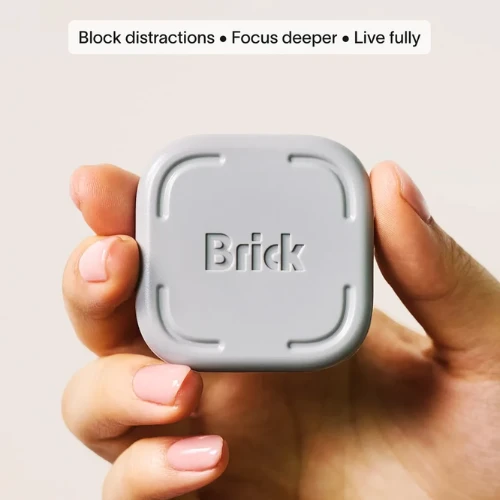
Can You Still Find Ways Around Brick Restrictions
Brick also has a Strict Mode that makes it more difficult to get around restrictions, including protections against changing settings or deleting the companion app during an active session. Its effectiveness depends on its configuration and software version.
There are also five Emergency Unbricks for times when you cannot reach the device. Brick's FAQ says you can request additional emergency access from support. These are valuable safeguards, although routinely using them to resume scrolling would weaken the habit you're trying to build.
A different workaround needs no technical trick at all. You can pick up a tablet, open a laptop or spend your unblocked time in another distracting app. Brick restricts selected phone apps, not every possible distraction.
Who Is Most Likely to Benefit From Getbrick
Getbrick is for people who know which applications are stealing their focus and want to make it harder for them to do so. Someone who needs frequently changing access to multiple apps may find the physical unlock frustrating. People whose main distractions happen on computers may also see limited benefit.
Try assessing it through three common questions:
- Can you articulate the problem clearly? Block apps and moments selectively, not everything.
- Can you take the friction? Put Brick somewhere you can get to it reliably, but far enough away to discourage impulse checks.
- Are you building a replacement habit? Decide what you will do when an urge appears, such as returning to work or taking a proper break.
The brick is compatible with iPhones running iOS 18 or later and Android 12 or later. One device can be used with multiple phones. Check current compatibility and settings before ordering.
FAQs
Does Brick Stop Calls and Important Messages?
You can choose what apps you want to block, so you can keep the important communication open. Brick isn’t allowed to block the Phone app under Apple’s iPhone rules. Test your messaging setup before you depend on it.
Can You Activate Phone Blocks Without Carrying Brick?
Yes. In the app, you can schedule a session or start a remote session. Usually, ending the session requires tapping your phone against the physical device.
What Happens if You Lose Your Brick?
The app includes five Emergency Unbricks. Brick's official FAQ directs people who need additional emergency access to contact customer support.
Is There a Subscription Fee?
No. The original Brick is hardware you buy, and it has an app that goes with it, and its main blocking features don’t require a monthly subscription.
Getbrick is most useful when its physical boundary interrupts a familiar impulse long enough for you to choose something better. It cannot guarantee self-control, and poor setup can make daily life unnecessarily difficult. Used consistently, though, it offers a practical way to make intentional phone use easier.
Looking for Getbrick promo codes or special offers? Check Brick Promo Codes for current promotions before purchasing.
Follow LeafySpark for more technology reviews and useful insights into the tools shaping everyday life.